Edge Visuals Module
The flashy stuff!!
Edge Visuals Moduleis for the flashy, bright, eye candy part of the trail.- This gives the feeling to the nature of the attack(slashing, ripping, weight) and the intensity.
- OR this can be used as a way to highlight the tip of the attack to make extent/reach of it more readable.
- Usually intended for more intense color/alpha values than the Base Visuals Module (But tbh, no one can stop you if you wanna use it as a very dark value for a blood or dark magic effect)
Controls;
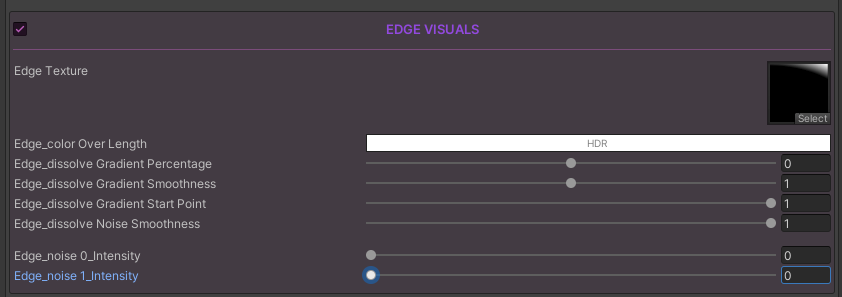
Abstract
In one look you can realize the two modules share many values that are named very similarly;
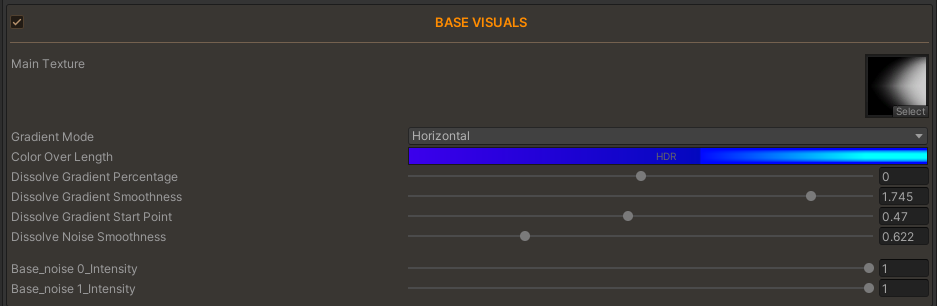
You can see we share;
- Gradient Percentage
- Gradient Smoothness
- Gradient Start Point
- Noise Smoothness
As we said before;
To check out how these values work, please check either the Base Visuals Module or the 4 Shared Control Values
Wait, we don't have the Gradient Mode here?
Initially we did during development; but while I was making Trails with the tool, I realized I was never using the GradientModes in the Edge Visuals.
I concluded that this reveals the GradientModes are not as useful when trying to make the Edge and they are just taking up either shader variants or even costing us in terms of psychological complexity.
More choices not always = better. I'll bring them back with a quick patch if I see users ask for it after release.