There is a small problem!!
If we have less FPS or some frame spikes, the trail can get really jagged edges.
30 FPS:
You can see the jaggedness in the trails, showing the edges much more.
Almost all trails have this problem.
This happens because we have 30 frames per second and we can only sample sword positions within frames. So the position of the sword in between frames is lost.
You'd think we don't have enough geometry but;
See the image below, I marked where the frames(Update, LateUpdate) happen, and in between them.
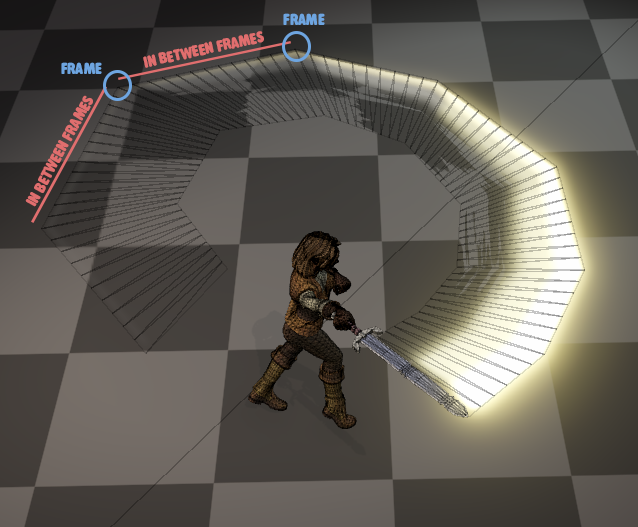
We DO have the geometry, but we just don't have enough position points to sample since we only get 30 of them a second and the sword is moving much faster.
Look at the video again, you'll see at the end the jaggedness doesn't show as much so this only happens with very fast motion+low framerate.
Solution
We go for a lightweight, patchy, half-solution in this case since it's enough for weapon trails 95% of the time while keeping it cheap in performance.
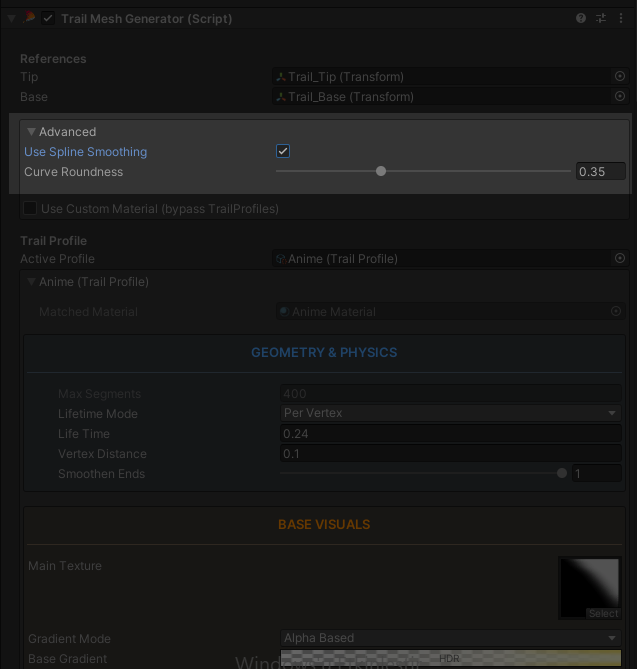
See the Advanced section within your TrailMeshGenerator Component. There is a choice for Spline smoothing
When we enable this, the trail looks much better even in 30 FPS;
Should be deactivated by default
This is not a perfect solution by any means. This is there just so we can support games that only target 30 FPS.(many mobile games do this.)
This can take some playing around with and you might need to animate the Curve Roundness value with your animation.
Because the perfect value depends on how fast the sword is moving, and that can change during the animation.
Unless the jaggedness is too much or too regular, I'd suggest not using this.